

Be like an elephant. Never forget.

Crossed a toll.Get reminded.Pay on time.

Six UK toll crossings have no barriers to stop you, just cameras that read your number plate. You pay online by midnight the day after you cross, and it is easy to forget. TollMate notices when you cross and reminds you to pay while there is still time.

Free for 2 weeks for new subscribers, then £1.49 a month or £14.99 a year. Cancel anytime. For iPhone with iOS 18.6 or later.

Covers Dartford Crossing Mersey Gateway Silver Jubilee Bridge Tyne Tunnels Humber Bridge Warburton Bridge

Why it's easy to get caught out

No barrier to stop you. Nothing to remind you.

01 · CAMERAS, NOT BARRIERS

You drive straight through

Cameras read your number plate as you cross. Nothing stops you, and nobody asks you to pay there and then.

02 · THE DEADLINE

Midnight, the day after

Cross on a Monday and you have until midnight on Tuesday to pay online. The rule is the same at all six crossings, seven days a week.

03 · THE PENALTY

A small toll becomes a fine

Miss it and you get a penalty of £25 to £70, depending on the crossing. Leave that unpaid and it can reach £100 or more.

Supported crossings

Six crossings, watched for you

TollMate watches for each of these crossings. When you cross one, it records the time and links you straight to that operator's own payment page.

Line drawing of the Queen Elizabeth II Bridge at Dartford

Dartford Crossing

The Dartford Tunnels and QEII Bridge, between Kent and Essex

M25 / A282Dart Charge

Charged 6am to 10pm. Cross outside those hours and TollMate marks the crossing Out of hours so you can confirm it was free.

Line drawing of the Mersey Gateway Bridge

Mersey Gateway Bridge

Across the River Mersey, between Runcorn and Widnes

A533Merseyflow
Line drawing of the Silver Jubilee Bridge arch

Silver Jubilee Bridge

The original arch bridge between Runcorn and Widnes

Merseyflow

Paid through Merseyflow, the same as the Mersey Gateway. TollMate names whichever bridge you used.

Line drawing of a Tyne Tunnel portal

Tyne Tunnels

Under the River Tyne, between Howdon and Jarrow

A19TT2
Line drawing of the Humber Bridge

Humber Bridge

Across the Humber, between Hessle and Barton-upon-Humber

A15Humber Bridge Toll

Pay-later camera tolling since 2 February 2026.

Line drawing of Warburton Bridge

Warburton Bridge

Over the Manchester Ship Canal, between Rixton and Warburton

B5159Warburton Toll Bridge

If you miss the deadline

CrossingPay byWhat a missed payment costs
Dartford CrossingDart ChargeMidnight the day after£70. Cut to £35 if paid within 14 days, raised to £105 if not paid. You still owe the crossing charge.
Mersey Gateway and Silver JubileeMerseyflow11:59pm the day afterFrom £25 plus the toll, rising if you don't pay promptly. After 42 days, £11 in court fees is added per notice.
Tyne TunnelsTT2Midnight the day after£30 plus the toll. £60 plus the toll from about day 15, £100 plus the toll from about day 30, then up to £79 more from a collection agency.
Humber BridgeHumber Bridge TollMidnight the day after£25 admin fee plus the toll. £50 plus the toll from about day 30, then a further £75 from a debt recovery agency from about day 60.
Warburton BridgeWarburton Toll BridgeMidnight the day after£30 if paid within 14 days, £60 within 28 days, £100 after that. Extra admin fees may apply.

Checked against each operator's own website on 21 October 2026: GOV.UK Dart Charge, Merseyflow, TT2, Humber Bridge and Warburton Toll Bridge. Operators can change their charges and deadlines, so check their terms if you're unsure.

Not covered: any other toll road, bridge or tunnel, the London Congestion Charge, ULEZ, or Clean Air Zones. You stay responsible for those, and for paying at every crossing above.

How it works

From the crossing to midnight

Set it up once. After that, TollMate does the remembering.

  1. You drive across

    TollMate works in the background, with your phone locked and the app closed. Your iPhone's location tells it when you've crossed, so there's nothing to open before a journey.

    Toll Detected: Silver Jubilee Bridgenow

    You've used Silver Jubilee Bridge. Pay by midnight tomorrow to avoid a fine.

  2. The reminders begin

    A Toll Detected alert arrives straight away. After that you're reminded every 1, 3 or 6 hours, whichever you choose. On deadline day a countdown starts at 9pm:

    21:0022:0023:0023:3023:45

    Wearing an Apple Watch? When your iPhone is locked, the reminders tap you on the wrist instead. There's no watch app to install.

    ⚠️ 1 Hour Left to Pay23:00

    Silver Jubilee Bridge: 1 hour until the midnight payment deadline.

    On your iPhone, or on your Apple Watch when your iPhone is locked or asleep.

  3. Pay, then tap Mark as Paid

    Tap Pay Now to open the operator's own payment page and pay them directly. Then tap Mark as Paid, in the app or on the reminder itself. The reminders stop and the crossing moves to your History.

    Weren't driving? Press and hold Mark as Paid for more options.

Try it

See exactly when your reminders arrive

Pick a crossing and a time. This follows the same schedule the app uses, using its default quiet hours of 23:00 to 07:00 (you can change these in the app).

Remind me every

    Times are UK time. Once you tap Mark as Paid, every reminder for that crossing stops. With quiet hours on, a reminder due overnight waits until 07:00, and only one is kept per morning.

    Press and hold

    Not yours to pay? Press and hold.

    Not every crossing is one you owe. Instead of tapping Mark as Paid, press and hold it, then tell TollMate why. Your History keeps a note of what you chose.

    Pedestrian

    You crossed on foot or by bike. The card moves to History, marked Pedestrian, and its reminders stop.

    Passenger

    Someone else was driving. TollMate asks whether to keep reminding you. Stop reminders clears the card. Keep reminders leaves it in Pending, marked Passenger, reminders on, so you can nudge the driver.

    Exempt Vehicle

    No charge applied to your vehicle this time. The card moves to History, marked Exempt Vehicle, and its reminders stop. If your vehicle is always exempt at a crossing, set it once in Settings › Discount Schemes instead.

    Mark as Free at Dartford

    The Dartford Crossing is free between 10pm and 6am, so those cards show Mark as Free instead of Mark as Paid. Tap it to confirm the crossing was free, or press and hold it for the same three options.

    Exempt and pre-pay cards

    If you've set a crossing to Exempt or Pre-pay and turned on Show scheme crossings in Settings, those cards appear in Pending with no buttons. Press and hold the card itself and choose Confirmed: scheme active to move it to History.

    Car parks

    Your car parks, too

    Save up to 10 car parks. When you arrive at one, TollMate starts reminding you, based on the time limit or payment deadline you set for it.

    Time limit

    For car parks that are free for a while, then fine you, like a supermarket or retail park.

    • Choose a limit from 10 minutes to 6 hours
    • Reminders as your time runs down, then an alert when the limit is reached
    • A live countdown on your Lock Screen, and in the Dynamic Island on iPhones that have one
    • Tap I've left when you drive away. TollMate never assumes you've gone.

    Pay by deadline

    For camera car parks where you pay online afterwards, like many airport car parks.

    • Set the deadline: the same day or the next day, at a time you choose
    • An alert when you arrive, then reminders until you pay
    • Tap Mark as Paid once you've paid

    TollMate only knows the limit or deadline you give it, not the car park's own terms, so always check the signs.

    Open TollMate after you arrive, for example by tapping the arrival notification, to start the countdown. It's available for limits of up to 8 hours.

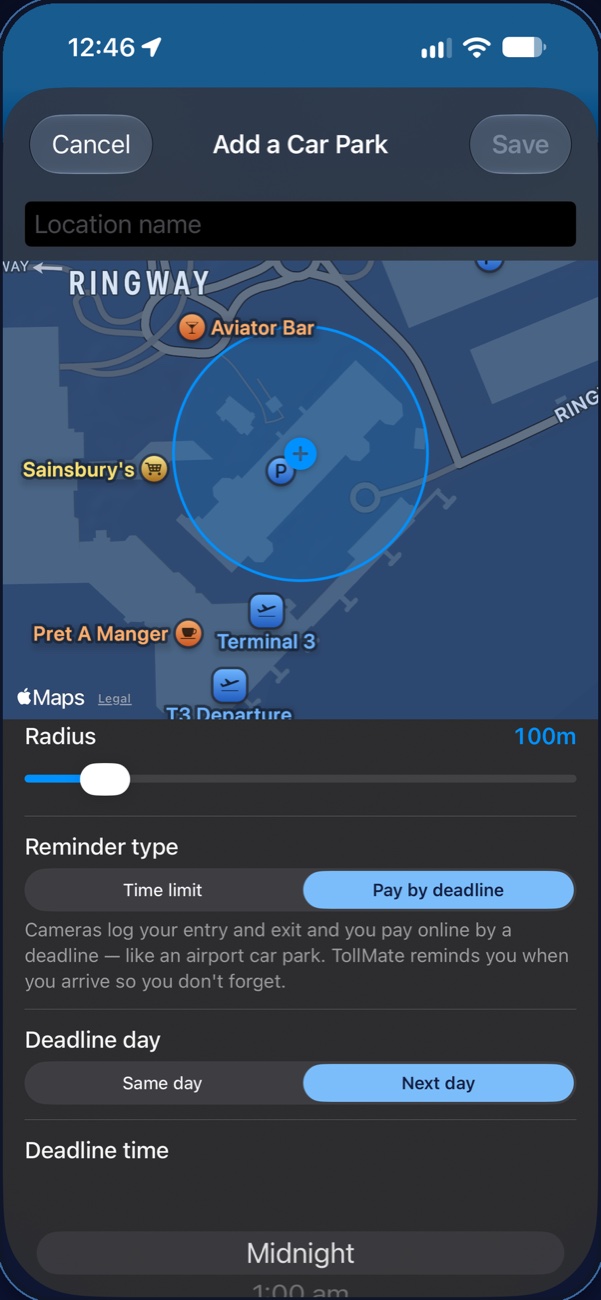
    TollMate's Add a Car Park screen: a name field, a map with a blue crosshair and a blue circle around an airport car park, a Radius slider set to 100 metres, and the reminder type set to Pay by deadline.
    Step 4: Set the radius. Hover or tap another step to see where it is.

    How to add a car park

    Drop the crosshair, size the circle, save

    1. Open the Car Parks list

      In TollMate, tap Monitored, choose Car Parks, then tap Add a Car Park or the + button.

    2. Name it

      Type a name, such as the shop or airport. Save stays greyed out until the car park has a name.

    3. Put the + on the car park

      The map opens where you are. The blue + stays in the middle of the map, so drag the map until the + sits on the car park. Pinch to zoom in or out.

    4. Set the radius

      Drag the Radius slider to grow or shrink the blue circle, from 50 to 500 metres. Make it cover the whole car park, including the entrance you drive in through. The circle is the area TollMate watches, and your arrival time is when your iPhone detects you inside it, so treat it as approximate.

    5. Pick the reminder type

      Time limit, then choose how long you can stay. Or Pay by deadline, then choose the same day or the next day, and a time.

    6. Tap Save

      TollMate starts watching it. To change the name, radius or reminder later, tap the car park in Monitored › Car Parks.

    You can save up to 10 car parks. Ones you've turned off still count, so delete any you no longer use.

    Getting started

    Set up in a couple of minutes

    TollMate can only spot a crossing if your iPhone lets it. Tick these off as you go. If anything changes later, each setting lives under Settings › Apps › TollMate.

    0 of 6 done

    Privacy

    Your location is never sent to us

    An app that asks for Always location should earn your trust. Here is exactly what happens to your data.

    Worked out on your iPhone

    Your location is processed on your device by Location Services. The developer never receives it.

    Synced through your own iCloud

    Your crossing history, car parks and settings sync through your private iCloud account, which we can't access.

    No account, no ads

    There's nothing to sign up for and no login. TollMate shows no adverts.

    No analytics or tracking

    No analytics tools and no third-party tracking. TollMate doesn't collect your data at all.

    App Store privacy label: Data Not CollectedRead the full Privacy Policy.

    Pricing

    One subscription. Everything included.

    TollMate is free to download. New subscribers get the first 2 weeks free on either plan, so you can see it work on a real crossing before you pay anything.

    AnnualSave 16%

    £14.99 / year

    Works out at about £1.25 a month.

    2 weeks free for new subscribers

    Monthly

    £1.49 / month

    Cancel whenever you like.

    2 weeks free for new subscribers

    Both plans include

    • All six toll crossings
    • Up to 10 car parks
    • Live countdowns on the Lock Screen and in the Dynamic Island
    • Reminder intervals, quiet hours and discount schemes
    • Crossing history, synced through your iCloud
    £70

    A full £70 Dart Charge penalty costs more than four years of TollMate Annual.

    UK prices. Subscriptions renew automatically unless cancelled at least 24 hours before the end of the trial or current period. Manage or cancel any time in TollMate under Settings › Manage Subscription, or in your Apple Account's Subscriptions.

    Help

    Questions, answered

    The same answers you'll find under Help & FAQ in the app.

    Still stuck?

    Email support. Include your iPhone model, iOS version, TollMate version and what happened. TollMate is built by a single developer, so please allow a few days for a reply.

    Does TollMate pay the toll for me?

    No. TollMate is a reminder only. It doesn't take payment or connect to any payment system. Pay Now opens the operator's own payment page, and you pay them directly. Check you're on the right page, and only do this when you're safely parked with the engine off.

    Do I need to keep the app open?

    No. TollMate detects crossings in the background, even when your phone is locked and the app is closed. That's why it needs location set to Always with Precise Location on.

    Why does it need my location set to Always?

    TollMate has to notice crossings, and arrivals at your saved car parks, while you're driving and the app is closed. iOS only allows that with Always access. Set to While Using, crossings will be missed. Your location is used only to detect crossings and car park visits on your own device. It is never collected or shared.

    Will it catch every crossing?

    It's accurate most of the time, but it depends on GPS, mobile signal and your settings, so it can occasionally miss a crossing or spot one late. Don't make it your only way of remembering. If you know you crossed, pay the operator directly.

    If crossings are often missed, check that location is set to Always and Precise Location is on.

    It showed a crossing I didn't make

    This can happen now and then, for example with a noisy GPS signal or a route that loops near a crossing. You shouldn't need to pay for a crossing you didn't make. Just dismiss the card. If you're unsure, check with the operator.

    Does it need mobile data?

    Not to detect a crossing or to send reminders. Your iPhone works out its location from GPS and, where available, mobile and Wi-Fi signals. A good mobile signal helps accuracy. You only need a connection to open an operator's payment page.

    My reminders aren't coming through

    Usually this is Do Not Disturb or a Focus mode. Allow Time Sensitive Notifications for TollMate, or add TollMate to a Focus mode's allowed apps in Settings › Focus. If notifications are turned off for TollMate entirely, reminders can't reach you at all, so check that first.

    Will my Apple Watch remind me too?

    Yes, and there's no watch app to install. When your iPhone is locked or asleep, iOS shows TollMate's reminders on your Apple Watch instead, as long as the watch is unlocked. When your iPhone is unlocked, they appear on the iPhone. They show on one or the other, not both.

    Your watch follows your iPhone's notification settings for TollMate. To change them just for the watch, open the Watch app on your iPhone and go to My Watch › Notifications › TollMate.

    I was a passenger, or on foot

    Press and hold Mark as Paid on the crossing card and choose Passenger or Pedestrian. Press and hold above explains what each option does.

    Which crossings aren't covered?

    TollMate covers only the six crossings above and the car parks you save. It doesn't cover other tolls, the London Congestion Charge, ULEZ or Clean Air Zones.

    Does it work on iPad or Android?

    TollMate is made for iPhone and needs iOS 18.6 or later.

    How do I cancel?

    In TollMate, go to Settings › Manage Subscription. Or open the Settings app, tap your name, then Subscriptions. Subscriptions are handled entirely by Apple.

    TollMate app icon: a white line-drawn elephant over a road

    Be like an elephant. Never forget.

    Download TollMate, give it two minutes to set up, and let it remember the tolls for you.

    Get TollMate on the App Store